jdx Flavored GitHub: Focused notification control for heavy GitHub workflows
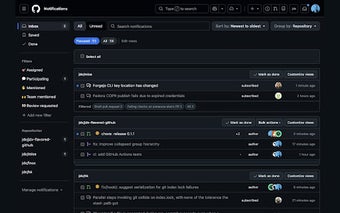
jdx Flavored GitHub, created by Jeff Dickey, is a Chrome extension that reduces notification noise and reshapes GitHub's web interface for power users. The extension focuses your inbox on actionable items while applying automated page-loading logic to surface relevant updates. It also offers in-browser defaults for pull request and issue lists and local UI state memory. The tool targets software developers and open-source maintainers who handle large volumes of PRs and notifications and want a cleaner inbox.
How does it reduce bot and stacked-notification clutter?
The extension groups repetitive updates, collapsing stacked pull requests and bot-generated PRs (for example Dependabot and Renovate) into single items so inbox lists contain fewer repeated entries. That grouping reduces repeated lines in long lists and makes high-volume feeds more scannable. The collapsing is automatic, so users do not need to manually fold similar items during review sessions.
How private and low-friction is setup?
Installation is zero-configuration; the extension operates on GitHub pages using the active browser session and does not request a personal access token. Because it modifies the web interface rather than calling GitHub APIs, setup requires no token entry and the extension functions immediately after installation in Chrome and other Chromium-based browsers.
How configurable are repository lists and inbox behavior?
Customization is available via an options page where users set what counts as relevant and define per-repository defaults for pull request and issue lists. Settings include hiding draft PRs by default and adjusting the target notification count that drives how many inbox pages load. These controls let maintainers adapt the extension to existing review workflows.
Who benefits most and what trade-offs should users expect?
Designed for heavy workflows, the extension suits developers and maintainers who manage many notifications and PRs. The developer background signals an emphasis on developer experience, but because the tool works in the browser UI it does not change server-side notification rules. That means teams seeking centralized, server-level notification changes must use other tools or GitHub settings alongside this extension.
Practical pick for maintainers who need inbox control
Targeted at software developers and open-source maintainers who face high notification volume, the extension offers a pragmatic, in-browser way to cut distraction and focus review time. As a practical tip, enable the extension in your primary Chromium browser and try its options page for a short evaluation period to confirm the per-repository filters match your workflow. The extension is best when you need browser-level noise reduction rather than server-side notification changes.